世界上只有一种真正的英雄主义,就是认清了生活的真相后还依然热爱它
27 March 2026
I run multiple Claude Code agents in parallel — different projects, different tasks, all pushing forward at the same time. On my local machine, notifications just work: an agent finishes, I get pinged, I switch over.
Then I needed to work on a remote server. I SSH’d in, fired up tmux, started Claude Code — and the notifications stopped. Agent finishes, I don’t know. Waiting for input, I don’t know. I’m back to polling my terminal like it’s 2005.
After living with this problem for a while, I found a few articles with solutions:
Their approach: Claude Code sends HTTP request → n8n workflow processes it → Gotify pushes notification → local webhook receives it → system notification.
It works. But it’s a lot of machinery for a notification:
30+ minutes to set up, plus ongoing maintenance. I just want to know when my agent is done.
Here’s the thing: your terminal already supports notifications. It has for years. OSC (Operating System Command) is a terminal escape sequence standard, and OSC 777 is specifically designed for notifications. Your terminal — iTerm2, Ghostty, Kitty, whatever — already knows how to display them.
The only reason it doesn’t work through tmux is… tmux. It intercepts escape sequences. But tmux also has a built-in escape hatch: passthrough mode.
ESC Ptmux ; ESC <OSC sequence> ESC \
Wrap your OSC 777 notification in passthrough, and tmux will politely let it through.
ESC ] 777 ; notify ; <title> ; <body> BEL
printf '\033Ptmux;\033\033]777;notify;Title;Body\007\033\\'
One line. Zero dependencies. No Docker, no webhook, no n8n.
Full source code at github.com/jamespan/claude-tmux-notify.
First, tell tmux to allow passthrough:
# ~/.tmux.conf
set -g allow-passthrough on
set -ga terminal-overrides ',*:allow-passthrough=on'
Key points:
printf output won’t be rendered by tmux. A temporary pane is created to emit the OSC sequence — tmux only renders output from visible panes to the outer terminal. The pane flashes briefly and works even if the active window has been switched away.-P option to prevent split-window from resetting the window name.-t "$WINDOW_ID" to specify the target window, otherwise it will incorrectly rename the currently active window.$, etc.) get interpreted by the shell. Solution: write the OSC sequence to a temp file first, then cat it in the temporary pane.awk substr to truncate by characters, not head -c which truncates by bytes and can break UTF-8 multi-byte characters.hook_source in the JSON input and adjusts the notification label and message extraction accordingly (Claude vs OpenCode).# ~/.claude/hooks/cmux-remote-notify.sh
#!/bin/bash
# Remote notification hook for Claude Code / OpenCode
# Sends desktop notifications via OSC passthrough + tmux passthrough
[ -n "$TMUX" ] || exit 0
LOCATION=$(tmux display-message -t "$TMUX_PANE" -p '#{session_name}:#{window_index}')
SHORT_PATH=$(tmux display-message -t "$TMUX_PANE" -p '#{pane_current_path}' | sed 's/.*\/\(.*\/.*\)/\1/')
WINDOW_ID=$(tmux display-message -t "$TMUX_PANE" -p '#{window_id}')
WINDOW_NAME=$(tmux display-message -t "$TMUX_PANE" -p '#{window_name}')
osc_notify() {
local body="${1:-}"
# Truncate by characters to avoid breaking UTF-8 multi-byte characters
body=$(echo "$body" | awk '{if(length($0)>100) print substr($0,1,100)"…"; else print}')
# Escape special characters to prevent shell interpretation
body=$(echo "$body" | sed "s/'/'\\\\''/g")
# Write to temp file to avoid shell special character issues
local tmp=$(mktemp)
printf '\033Ptmux;\033\033]777;notify;%s @ tmux:%s;%s\007\033\\' "$AGENT_LABEL" "$LOCATION" "$body" > "$tmp"
# A temporary pane is required to emit OSC sequences: tmux only renders output from
# visible panes to the outer terminal. Background process output is silently dropped.
# This pane flashes briefly and works even if the active window has been switched away.
tmux split-window -v -l 1 -P "cat '$tmp'; rm -f '$tmp'" 2>/dev/null
}
add_bell_indicator() {
local active=$(tmux display-message -t "$WINDOW_ID" -p '#{window_active}')
# Skip if the window is already active (user is already looking at it)
[[ "$active" == "1" ]] && return
[[ "$WINDOW_NAME" =~ ^🔔[[:space:]] ]] && return
# Use -t to specify target window, avoid renaming active window
tmux rename-window -t "$WINDOW_ID" "🔔 $WINDOW_NAME"
}
json_extract() {
local json="$1" key="$2"
echo "$json" | grep -o "\"$key\"[[:space:]]*:[[:space:]]*\"[^\"]*\"" \
| sed 's/.*: *"\([^"]*\)".*/\1/' | head -1
}
truncate_line() {
tr '\n' ' ' | sed 's/ */ /g' | awk '{if(length($0)>80) print substr($0,1,80)"…"; else print}'
}
INPUT=$(cat)
EVENT="$1"
# Detect agent source: OpenCode includes hook_source in its JSON, Claude does not
if echo "$INPUT" | jq -e '.hook_source == "opencode-plugin"' &>/dev/null; then
AGENT_LABEL="OpenCode"
else
AGENT_LABEL="Claude"
fi
claude_last_assistant_text() {
if command -v jq &>/dev/null; then
echo "$INPUT" | jq -r '.last_assistant_message // empty' 2>/dev/null | truncate_line
else
json_extract "$INPUT" "last_assistant_message" | truncate_line
fi
}
opencode_last_assistant_text() {
local session_id=$(echo "$INPUT" | jq -r '.session_id // empty' 2>/dev/null)
[[ -z "$session_id" ]] && return
command -v sqlite3 &>/dev/null || return
[[ "$session_id" =~ ^[a-zA-Z0-9_-]+$ ]] || return
local db="$HOME/.local/share/opencode/opencode.db"
[ -f "$db" ] || return
sqlite3 "$db" "SELECT json_extract(data, '$.text') FROM part WHERE message_id IN (SELECT id FROM message WHERE session_id = '$session_id' AND json_extract(data, '$.role') = 'assistant' ORDER BY time_created DESC LIMIT 1) AND json_extract(data, '$.type') = 'text' ORDER BY time_created DESC LIMIT 1" 2>/dev/null | truncate_line
}
case "$EVENT" in
stop|idle)
if [[ "$AGENT_LABEL" == "OpenCode" ]]; then
LAST_MSG=$(opencode_last_assistant_text)
else
LAST_MSG=$(claude_last_assistant_text)
fi
osc_notify "${LAST_MSG:-$SHORT_PATH ✓}"
sleep 0.2
add_bell_indicator
;;
notification|notify)
if command -v jq &>/dev/null; then
BODY=$(echo "$INPUT" | jq -r '.body // "Needs input"' 2>/dev/null | awk '{if(length($0)>100) print substr($0,1,100)"…"; else print}')
else
BODY=$(json_extract "$INPUT" "body")
[ -z "$BODY" ] && BODY="Needs input"
fi
osc_notify "$SHORT_PATH: $BODY"
sleep 0.2
add_bell_indicator
;;
esac
When switching to a window with 🔔, automatically clear it:
# ~/.claude/hooks/tmux-clear-bell.sh
#!/bin/bash
WIN_NAME=$(tmux display-message -p '#{window_name}')
if [[ "$WIN_NAME" =~ ^🔔[[:space:]] ]]; then
    CLEAN_NAME="${WIN_NAME#🔔 }"
    tmux rename-window "$CLEAN_NAME"
fi
# Enable focus-events and set hook
tmux set-option -g focus-events on
tmux set-hook -g pane-focus-in "run-shell '~/.claude/hooks/tmux-clear-bell.sh'"
chmod +x ~/.claude/hooks/tmux-clear-bell.sh
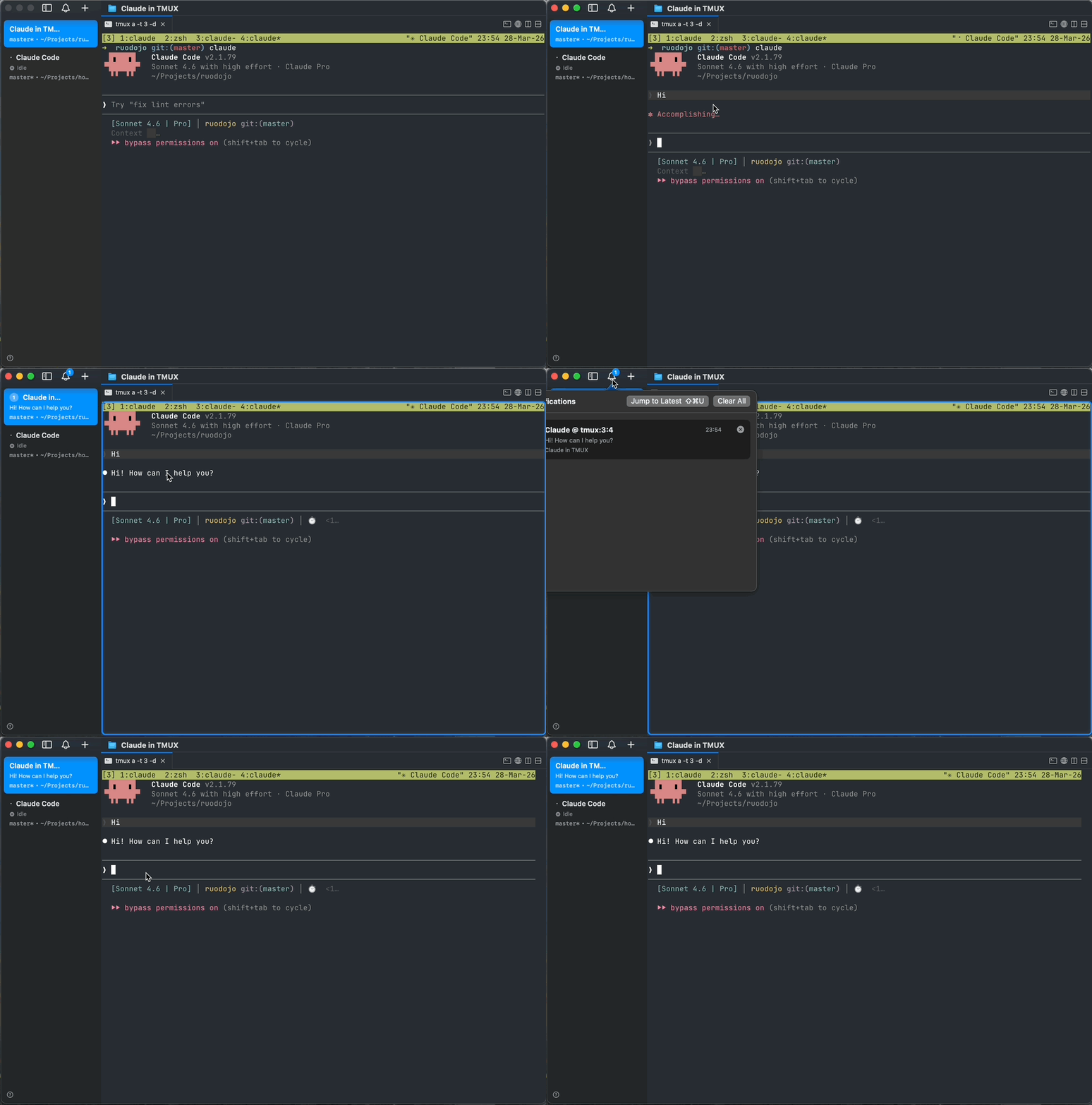
Notification format: Claude @ tmux:3:1 → Projects/ruodojo ✓ (title shows location, body shows directory)
Window shows 🔔 prefix, which disappears when you switch to it.
// ~/.claude/settings.json
{
  "hooks": {
    "Stop": [{
      "matcher": "",
      "hooks": [{ "type": "command", "command": "~/.claude/hooks/cmux-remote-notify.sh stop" }]
    }],
    "Notification": [{
      "matcher": "",
      "hooks": [{ "type": "command", "command": "~/.claude/hooks/cmux-remote-notify.sh notification" }]
    }]
  }
}
chmod +x ~/.claude/hooks/cmux-remote-notify.sh
This hook also works with OpenCode via the oh-my-openagent bridge plugin, which implements the Claude Code hook protocol on the OpenCode side. The script auto-detects the caller via the hook_source field in the JSON input and adjusts the notification label and message extraction accordingly.
Agent finishes → Hook script → OSC 777 in tmux pane
                                      ↓
                              tmux passthrough
                                      ↓
                              SSH connection
                                      ↓
                          Local terminal → System notification
The full notification flow:
hook_source field to determine if the caller is Claude or OpenCode, adjusts notification label and message extraction accordingly🔔 prefix added to the tmux window name so you know which window to go toWith this notification setup, my remote agents work exactly like my local cmux agents. Each agent runs in its own tmux window, I get pinged when it needs me, and I can run multiple agents in parallel without babysitting any of them.
My typical remote layout: one tmux session per project, multiple tmux sessions connected at once. Inside each session, different windows and panes manage different task groups — one window for the agent doing the main coding, another for the agent running tests, another for monitoring. When any agent across any session finishes, the notification tells me exactly which project and which window needs attention.
Notifications are the nervous system of the agent legion. Without them, you’re manually polling windows. With them, you context-switch on demand and stay focused on whatever else you’re doing.
The 🔔 prefix on tmux window names is a workaround, by the way. Right now cmux can auto-switch to the right tab when a notification comes in, but it can’t reach into tmux to switch to a specific window. So the bell tells you which window to go to manually. This is a temporary compromise — if cmux adds a hook that fires when you click a notification and land on the tab (so you can run a custom command like tmux select-window -t bell), we’d be able to jump directly to the tmux window where Claude Code is waiting for input. Fingers crossed.
One gotcha: don’t run a local Claude Code session in the same cmux workspace. cmux detects claude_code processes and suppresses OSC 777 notifications to avoid duplicating its built-in Claude hook. Your hook script’s notifications would be silently dropped. Instead, create a dedicated cmux workspace for SSH connections to your remote server.
This solution depends on:
If your terminal doesn’t support OSC 777, consider using OSC 9 (Windows Terminal) or OSC 99 (some terminal emulators).
tmux show -g allow-passthrough — should be on. Restart tmux after changing config.awk substr for UTF-8 safe truncation. If still broken, check your locale settings (echo $LANG).printf '\033]777;notify;Test;Hello\007' directly in your local terminal.| Feature | OSC Passthrough | n8n + Gotify |
|---|---|---|
| Dependencies | None | n8n, Gotify, Docker, webhook |
| Setup time | 2 minutes | 30+ minutes |
| Maintenance | None | Need to maintain multiple services |
| Click to jump | ❌ | ✅ |
| Multi-device | ❌ | ✅ |
| Complexity | Low | High |
If you just want to receive notifications when remote Claude Code finishes tasks, you don’t need to build a complex service stack. tmux passthrough + OSC 777 is enough, done in two minutes.
Of course, if you need to click notifications to jump to specific locations, or push to multiple devices, the n8n solution might be more suitable. But for most scenarios, simple is beautiful.
The complete source is at github.com/jamespan/claude-tmux-notify. The clean markdown version of this article is at /md/terminal-notifications-claude-code-remote-tmux-en.md — feed it to Claude Code to automate the setup.